
Your AI Agent Can Render UI. Here's How.
Most AI agent interfaces look the same. A text bubble streams in. Maybe a collapsible JSON block shows the tool call arguments. Then more text. It works, but it is the equivalent of building a web app that only renders <pre> tags.
What if the agent could render actual React components? An image grid from a stock photo search. A color palette extracted from a design file. A live HTML layout preview. All inline in the chat, triggered by tool execution, with zero manual wiring.
We built this. The pattern is called Generative UI, and the mechanism is surprisingly clean: ToolBehavior hooks + AG-UI STATE_SNAPSHOT events + a frontend component registry.
The Pattern
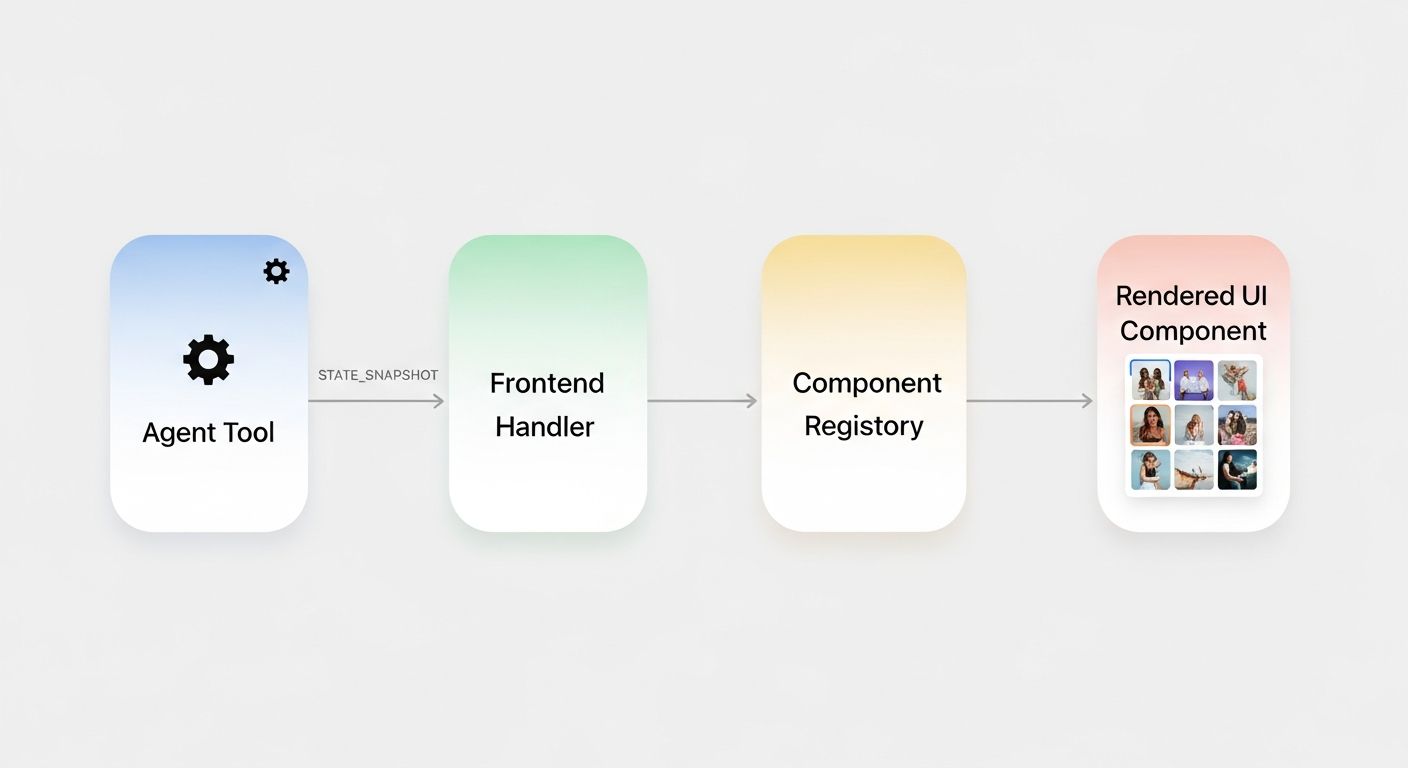 The generative UI pipeline: a tool executes, a ToolBehavior hook emits a STATE_SNAPSHOT, and the frontend maps it to a React component.
Here is the full pipeline in five steps:
- User asks: "Find me hero images for a fitness app"
- Agent calls the
search_imagestool - Tool executes, returns image data from an API
- A
ToolBehaviorhook fires after execution - The hook emits a
STATE_SNAPSHOTwith acustom_ui_componentspayload - Frontend detects the payload, matches
"image_grid"to<ImageGrid />, renders it inline
No special event types. No framework plugins. Just state events and a component lookup.
Backend: The ToolBehavior Hook
On the Python side, each tool can have a ToolBehavior that fires before or after execution. For generative UI, we use state_from_result because we need the actual API response.
async def _image_search_state_from_result(context) -> dict | None:
    result = _parse_tool_data(context.result_data)
    images = result.get("images", [])
    if not images:
        return None

    return {
        "custom_ui_components": [{
            "component": "image_grid",
            "props": {
                "images": images,
                "query": result.get("query", ""),
                "total_results": result.get("total_results", 0),
            },
        }]
    }
This gets wired into the agent config:
agent_config = StrandsAgentConfig(
    tool_behaviors={
        "search_images": ToolBehavior(
            state_from_result=_image_search_state_from_result,
        ),
    },
)
When search_images finishes, ag_ui_strands calls the hook, takes the returned dict, and emits it as a STATE_SNAPSHOT SSE event to the frontend. That is the entire backend change.
Frontend: Component Registry
The frontend watches for STATE_SNAPSHOT events that contain custom_ui_components. When it finds one, it attaches the component data to the current assistant message.
The type is intentionally simple:
interface GenerativeUIEvent {
  component: string;                    // "image_grid", "color_palette", etc.
  props: Record<string, unknown>;       // component-specific props
}
The renderer is a lookup table:
function GenerativeUIRenderer({ event }: { event: GenerativeUIEvent }) {
  switch (event.component) {
    case "image_grid":
      return <ImageGrid {...event.props as ImageGridProps} />;
    case "color_palette":
      return <ColorPalette {...event.props as ColorPaletteProps} />;
    case "layout_preview":
      return <LayoutPreview {...event.props as LayoutPreviewProps} />;
    default:
      return null;
  }
}
No dynamic imports. No component serialization over the wire. The agent sends a discriminator string and props. The frontend already has the components compiled in.
state_from_args vs state_from_result
This is the key design decision when wiring ToolBehavior hooks. Both emit STATE_SNAPSHOT events, but at different points in the tool lifecycle:
| Hook | Fires | Use when | Latency |
|------|-------|----------|---------|
| state_from_args | BEFORE tool executes | The args contain the state you want | Instant |
| state_from_result | AFTER tool executes | You need the actual execution result | Delayed |
Concrete examples from our codebase:
plan_task_stepsusesstate_from_args. The step descriptions are in the tool arguments. The UI shows planned steps immediately, before the tool even runs.start_dev_serverusesstate_from_result. The preview URL only exists after the server actually starts. No point showing it early.search_imagesusesstate_from_result. The image URLs come from the Unsplash API response. Cannot predict them from the args.write_fileusesstate_from_args. The file path is in the arguments. We track it immediately so the file list updates before the write completes.
The rule of thumb: if the data you want is in the input, use state_from_args. If it is in the output, use state_from_result.
Build Your Own in Three Steps
Want to add a generative UI component to your own agent? Here is the checklist:
-
Define a ToolBehavior hook. Write an async function that takes a
ToolResultContext(orToolCallContext), extracts the data you want, and returns{ "custom_ui_components": [{ "component": "your_widget", "props": {...} }] }. -
Register it in your agent config. Add it to the
tool_behaviorsdict:"your_tool": ToolBehavior(state_from_result=your_hook). -
Add a case to your frontend renderer. Map the component string to a React component. The props will arrive exactly as you returned them from the hook.
That is it. No protocol extensions. No custom event types. Just state snapshots carrying typed payloads, and a frontend that knows what to do with them.
The agent writes code, searches images, generates color palettes. The UI renders them as first-class components. The protocol in between does not care what the payload is. It just moves state.
References